 MergenHub
 MergenHub is an OPC UA server (Data Access, Historical Access, Alarms & Conditions, Methods) that presents every channel, device and tag in one address space. Any UA client — SCADA, MES, historian, PLC, another MergenHub — connects to it.
opc.tcp://<host>:48010/MergenHub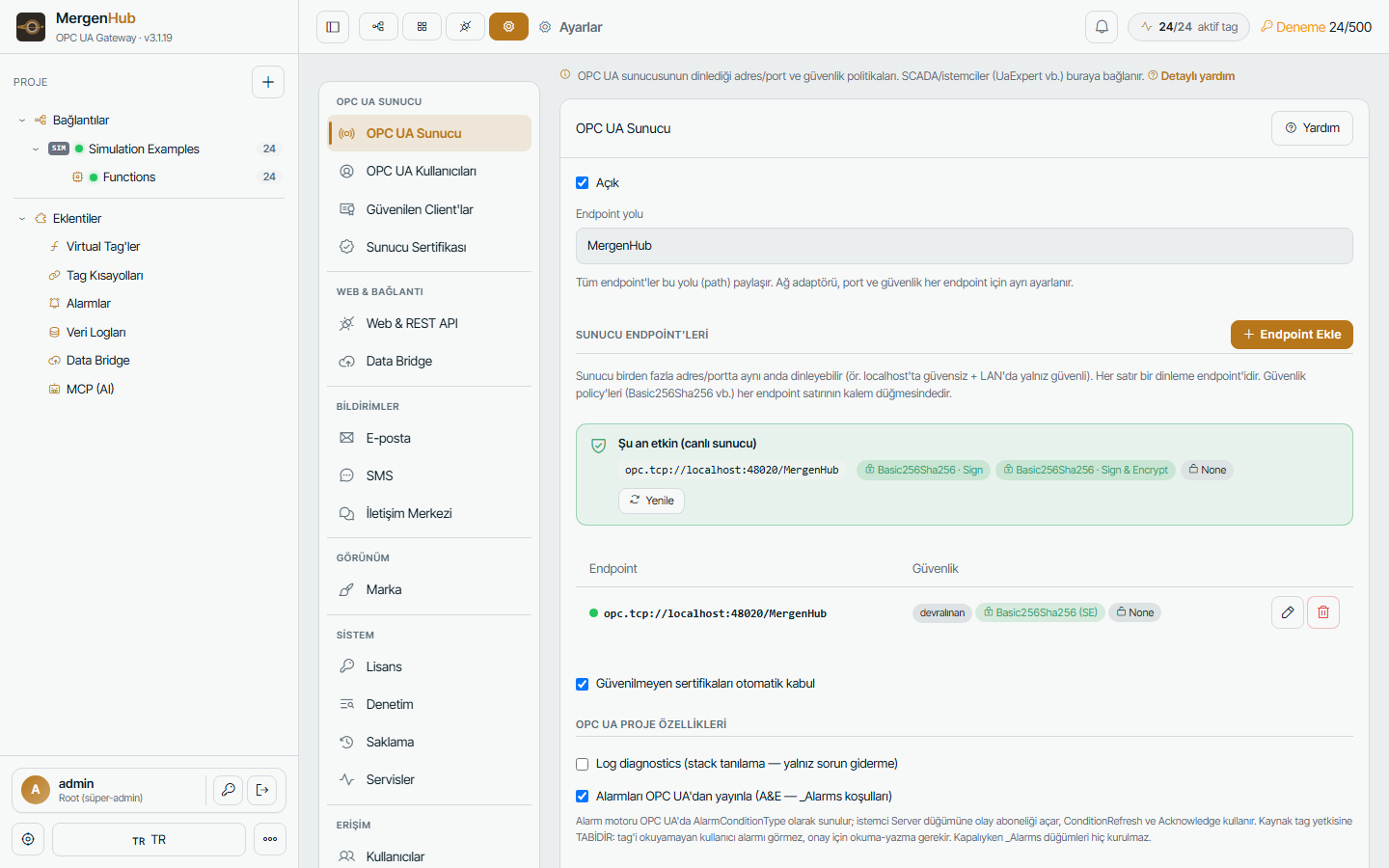
Address space
Objects
 └─ <Channel>
     └─ <Device>
         ├─ <Tag>  (Variable: value, quality, source/server timestamps, EngineeringUnits, Description)
         ├─ <TagGroup>/…
         └─ _System (_Error, _NoError, _LastRead, _SuccessfulReads, _Enabled …)
 ├─ _Aliases
 ├─ _AdvancedTags
 ├─ _Alarms (when "publish alarms over OPC UA" is on)
 └─ _System (server-wide statistics)
Node ids are string-based (ns=2;s=Channel.Device.Tag) so they stay stable across restarts and exports.
Endpoints
The server can listen on several endpoints at once (Settings › OPC UA Server › Endpoints): for example localhost without security for a local client and the LAN/public host with Basic256Sha256 – Sign & Encrypt. Each endpoint has its own host, port and allowed security policies. Changing endpoints takes effect after a runtime restart.
Security
| Setting | Recommendation |
|---|---|
| Security policies | None only on localhost; Basic256Sha256 Sign & Encrypt elsewhere |
| Allow anonymous | off in production |
| User authentication | Settings › OPC UA Users: user/password accounts with roles; certificates supported |
| Auto-accept untrusted certificates | off in production; trust clients in Settings › Trusted clients |
| Server certificate | generated at install; regenerate when the host name changes (Settings › Server certificate) |
Per-user resource ACL applies to OPC UA too: a user who cannot see a channel in the UI does not see it in the address space, and writes require the write permission. See Users and security.
Session and subscription limits
Defaults: 128 sessions, session timeout 20 min, up to 450K monitored items proven. Publishing intervals down to 100 ms; the server honours client-requested sampling rates (scan mode respect client rate) so subscribers can drive polling.
History access
Tags that belong to a historian log group answer HistoryRead (raw and processed aggregates) directly from the historian database, so UA clients can plot trends without a separate historian. See Historian.
Alarms & Conditions
With Publish alarms over OPC UA enabled, every alarm definition becomes an AlarmConditionType under _Alarms; clients subscribe to the Server object for events, use ConditionRefresh and Acknowledge. State mapping follows ISA-18.2 (active/acked/cleared). See Alarms.
Methods
Server-side methods are exposed for runtime control (restart a channel, force a read) to authorised users only.
Connecting common clients
- UaExpert — Add server › enter the endpoint URL › choose security › trust the server certificate; if auto-accept is off, trust the UaExpert certificate in Settings › Trusted clients.
- Kepware / Ignition / Siemens WinCC — use the same endpoint; for signed sessions import MergenHub's certificate (
pki\own) into the client's trust store. - Another MergenHub — use the OPC UA client driver with this server as the channel.
Troubleshooting
| Symptom | Fix |
|---|---|
BadCertificateHostNameInvalid | Client connects with a name not in the certificate — add an endpoint with that host and regenerate the server certificate |
BadSecurityChecksFailed / BadCertificateUntrusted | Trust the client certificate (Settings › Trusted clients) or enable auto-accept temporarily |
BadIdentityTokenRejected | Anonymous disabled and wrong user/password |
| Client sees Bad quality | Device offline or trial window expired — check Connectivity and the Event log |
| Server "not running" in the UI | Port in use by another OPC server; change the port in Endpoints |