 MergenHub
SMART PCS — Pressure Management (PRV)
Manages an actuated pressure reducing valve: inlet/filter/outlet pressures, actuator position, auto/manual and set pressure; cuts leakage.
| Brand | Envest |
|---|---|
| Model | SMART PCS (AQUA CNT 100S) |
| Firmware / software | Aqua-BKV V1.1 |
| Protocol (driver) | Modbus TCP/IP Ethernet |
| Package | 113 tag · 3 calculated · 8 screens · 216 KB |
| Product page | envest.com.tr ↗ |
SHA-256 6a62d79ace2c4ed4… · updated 2026-10-17
What it does
SMART PCS is an integrated system that runs pressure management areas automatically: a pilot-operated pressure reducing valve with proportional actuator, the AQUA CNT 100S controller, an electromagnetic flowmeter needing no straight pipe run, a strainer, three pressure sensors, batteries and a solar panel. At 110 cm for DN150 it fits narrow manholes.
The package targets the Aqua-BKV V1.1 firmware: 113 tags, a PRV station screen, 7 settings screens and 3 calculated tags.
How it works
Why?
The higher the line pressure, the more water leaks; most bursts come from sudden pressure changes. Holding pressure at the lowest safe value for the demand saves water and energy and extends asset life.
Modes
- Manual: the actuator brings outlet pressure to the user's set point.
- Scheduled: separate set points for 12 time slots; separate programmes for holidays.
- Critical point reference: the valve is adjusted (PID) so the pressure read by another AQUA CNT in the network reaches the target.
Safety
Upper/lower limits for flow and inlet pressure; on alarm the valve can fully close, fully open or move to a set opening. Batteries keep it running up to 48 hours without power.
What it looks like once installed
The same package installs on the MergenHub server (web interface, any computer) and in the MergenHub Mobile app. These are the screens it creates — taken from the real applications with simulated field values.
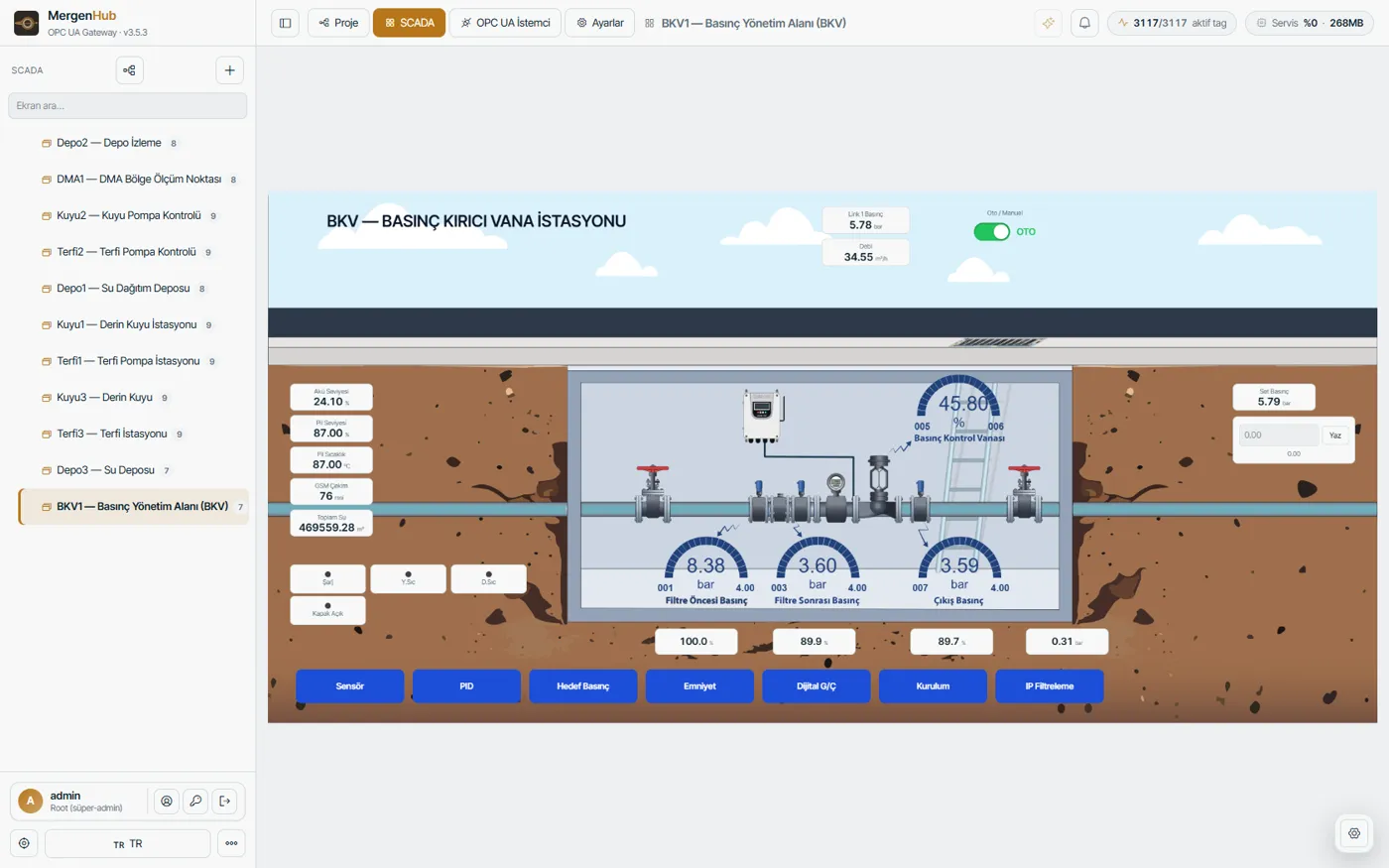
 Settings screen (one of several, opened from the buttons) ↗
 Summary
 Settings tab
In the package
- 113 tags (Aqua-BKV V1.1)
- PRV station screen and 7 settings screens
- Inlet, strainer outlet and system outlet pressures; actuator position
- Manual, scheduled and critical-point pressure control
- Modbus TCP (GSM)
Asked during install
Besides the channel and device name, only these are asked; everything else comes ready.
| Field | Default | Explanation |
|---|---|---|
| IP adresi * | — | |
| Bağlantı | ||
| Port * | 502 | |
| Unit ID * | 1 | |
Screens
- BKV1 — Basınç Yönetim Alanı (BKV)1903×912
- BKV1 — Sensörsettings screen · 1240×918
- BKV1 — PIDsettings screen · 1240×368
- BKV1 — Hedef Basınçsettings screen · 1240×356
- BKV1 — Emniyetsettings screen · 1240×574
- BKV1 — Dijital G/Çsettings screen · 1240×528
- BKV1 — Kurulumsettings screen · 1240×620
- BKV1 — IP Filtrelemesettings screen · 1240×356
Phone screens (MergenHub Mobile, phone mode)
- BKV1 — Özetsummary
- BKV1 — Sensörsettings tab
- BKV1 — PIDsettings tab
- BKV1 — Hedef Basınçsettings tab
- BKV1 — Emniyetsettings tab
- BKV1 — Dijital G/Çsettings tab
- BKV1 — Kurulumsettings tab
- BKV1 — IP Filtrelemesettings tab
Screens are fully editable after install. The MergenHub server gets the main screen with its 3D artwork and the wide settings screens; phone mode of MergenHub Mobile gets a summary screen with single-column settings tabs.
Tag list
| Name | Address | Type | Access | Description |
|---|---|---|---|---|
| 021_PILSEVIYE | 400021 | Word | read/write | |
| 024 | 400024 | Word | read/write | |
| 095_LOGTUTMASIKLIGI | 400095 | Word | read/write | |
| 096_KAYITLILOGBLOK | 400096 | DWord | read/write | |
| 098_KAYITLISAYFASAYISI | 400098 | Word | read/write | |
| 099_GOSTERILECEKSAYFASAYISI | 400099 | Word | read/write | |
| AcmaRoleCikis | 400093 | Word | read/write | |
| AktuatorAnlikPoz | 400001 | Word | read/write | |
| AktuatorStatus | 400002 | Word | read/write | |
| AlarmDurumHaraketSaniye | 400054 | Word | read/write | |
| AlarmDurumPozisyon | 400053 | Word | read/write | |
| ALARMLAR | 400019 | Word | read/write | |
| AnalogPozSecimGiris | 400090 | Word | read/write | |
| BakiyeKlor | 400006 | Word | read/write | |
| BeslemeVoltaji | 400023 | Word | read/write | |
| Bulaniklik | 400008 | Word | read/write | |
| CikisBasinc | 400207 | Float | read/write | |
| CikisBasincGiris | 400087 | Word | read/write | |
| CikisBasincSet | 400083 | Word | read/write | |
| CONTROLWORD1 | 400027 | Word | read/write | |
| CONTROLWORD2 | 400028 | Word | read/write | |
| CumaSaatiSet | 400078 | Word | read/write | |
| Debi | 400201 | Float | read/write | |
| DEBI_GIRIS | 400084 | Word | read/write | |
| Debi_Set | 400080 | Word | read/write | |
| DEBIMETREPULSCARPANI | 400091 | Word | read/write | |
| DebimetreTipSecim | 400092 | Word | read/write | |
| DijitalCikislar | 400026 | Word | read/write | |
| DijitalGirisler | 400015 | Word | read/write | |
| RTCUnixTime | 400016 | DWord | read/write | |
| FiltreCikisBasinc | 400205 | Float | read/write | |
| FiltreCikisBasincGiris | 400086 | Word | read/write | |
| FiltreCikisBasincSet | 400082 | Word | read/write | |
| FiltreFarkBasinc | 400012 | Word | read/write | |
| GirisBasinc | 400203 | Float | read/write | |
| GirisBasincGiris | 400085 | Word | read/write | |
| GirisBasincSet | 400081 | Word | read/write | |
| HatKORUMAMAX_BASINC | 400050 | Word | read/write | |
| hatKORUMAMAX_DEBI | 400052 | Word | read/write | |
| HatKORUMAMIN_BASINC | 400049 | Word | read/write | |
| HatKORUMAMIN_DEBI | 400051 | Word | read/write | |
| HEDEFBESLEMEIP1 | 400042 | Word | read/write | |
| HEDEFBESLEMEIP2 | 400043 | Word | read/write | |
| HEDEFBESLEMEIP3 | 400044 | Word | read/write | |
| HEDEFBESLEMEIP4 | 400045 | Word | read/write | |
| HEDEFBESLEMEMODBUSADRES | 400046 | Word | read/write | |
| HEDEFBESLEMEMODBUSID | 400047 | Word | read/write | |
| HEDEFBESLEMEMODBUSPORT | 400048 | Word | read/write | |
| IZINLIIP1_1 | 400034 | Word | read/write | |
| IZINLIIP1_2 | 400035 | Word | read/write | |
| IZINLIIP1_3 | 400036 | Word | read/write | |
| IZINLIIP1_4 | 400037 | Word | read/write | |
| IZINLIIP2_1 | 400038 | Word | read/write | |
| IZINLIIP2_2 | 400039 | Word | read/write | |
| IZINLIIP2_3 | 400040 | Word | read/write | |
| IZINLIIP2_4 | 400041 | Word | read/write | |
| KapakAcildiDedektorGiris | 400089 | Word | read/write | |
| KapatmaRoleCikis | 400094 | Word | read/write | |
| LinklemeHedefBasinc | 400013 | Word | read/write | |
| MANUELVANAORANI | 400029 | Word | read/write | |
| PazarSaatiSet | 400079 | Word | read/write | |
| PH | 400007 | Word | read/write | |
| PID_BasincGirisSecim | 400030 | Word | read/write | |
| PID_ZamanSaniye | 400031 | Word | read/write | |
| PILSicaklik | 400022 | Short | read/write | |
| SetEdilenBasinc | 400014 | Word | read/write | |
| STATUSWORD | 400020 | Word | read/write | |
| SuBaskiniGirisSecim | 400088 | Word | read/write | |
| ToplamDebimetre | 400003 | Float | read/write | |
| UYARILAR | 400018 | Word | read/write | |
| XP_1_Set | 400066 | Word | read/write | |
| XP_10_Set | 400075 | Word | read/write | |
| XP_10Bit_11Bas | 400064 | Word | read/write | |
| XP_11_Set | 400076 | Word | read/write | |
| XP_11Bit_12Bas | 400065 | Word | read/write | |
| XP_12_Set | 400077 | Word | read/write | |
| XP_1Bit_2Bas | 400055 | Word | read/write | |
| XP_2_Set | 400067 | Word | read/write | |
| XP_2Bit_3Bas | 400056 | Word | read/write | |
| XP_3_Set | 400068 | Word | read/write | |
| XP_3Bit_4Bas | 400057 | Word | read/write | |
| XP_4_Set | 400069 | Word | read/write | |
| XP_4Bit_5Bas | 400058 | Word | read/write | |
| XP_5_Set | 400070 | Word | read/write | |
| XP_5Bit_6Bas | 400059 | Word | read/write | |
| XP_6_Set | 400071 | Word | read/write | |
| XP_6Bit_7Bas | 400060 | Word | read/write | |
| XP_7_Set | 400072 | Word | read/write | |
| XP_7Bit_8Bas | 400061 | Word | read/write | |
| XP_8_Set | 400073 | Word | read/write | |
| XP_8Bit_9Bas | 400062 | Word | read/write | |
| XP_9_Set | 400074 | Word | read/write | |
| XP_9Bit_10Bas | 400063 | Word | read/write | |
| otoman | 400028.0 | Boolean | read/write | |
| PilSarjOluyor | 400020.1 | Boolean | read/write | |
| PilSicaklikDusuk | 400020.5 | Boolean | read/write | |
| PilSicaklikYuksek | 400020.6 | Boolean | read/write | |
| Al_Subaskini | 400018.9 | Boolean | read/write | |
| Al_KapiAcik | 400018.10 | Boolean | read/write | |
| Al_GirisVoltajYuksek | 400018.11 | Boolean | read/write | |
| AktuatorAdim | 400024 | DWord | read/write | |
| GsmCekimGucu | 400026 | Word | read/write | |
| XACT_AktuatorKirinimBasinc | 400090 | Word | read/write | |
| AktuatorMaxKonum | 400093 | DWord | read/write | |
| VanaManuelAc | 400027.3 | Boolean | read/write | |
| VanaManuelKapat | 400027.4 | Boolean | read/write | |
| XACT_VanaKapaliKonumSet | 400027.5 | Boolean | read/write | |
| XACT_VanaAcikKonumSet | 400027.6 | Boolean | read/write | |
| XACT_SistemAktifPasif | 400028.4 | Boolean | read/write | |
| T_SuSayac | 400003 | Float | read/write | |
| AlarmResetle | 400027.0 | Boolean | read/write | |
| SuHizi | 400006 | Word | read/write | |
| PidOluAlanYuzde | 400033 | Word | read/write |
How to install
MergenHub server
- Web interface › Device Library
- Find this device, tick it, Install
- Enter IP and station name
MergenHub Mobile
- Add device › Device library
- Works in server mode and phone mode
- Answer the install questions
File + AI
- Download the .mhpkg.json file
- Optional: give it to an AI assistant with your changes (the file has a built-in guide)
- Import: MergenHub or the mobile app › Import package