 MergenHub
Envest OCS110 (Omron) — Reservoir
Omron CP2E based reservoir panel: four flowmeters, residual chlorine / pH / turbidity, chlorine dosing; FINS Ethernet.
This is a device template: a ready-made package that lets the MergenHub software connect to this device.
| Brand | Envest |
|---|---|
| Model | OCS110 Depo Panosu (Omron CP2E) |
| Firmware / software | OCS110 Depo |
| Protocol (driver) | Omron FINS Ethernet |
| Package | 163 tag · 0 calculated · 8 screens · 1,024 KB |
| Manufacturer’s page | envest.com.tr ↗ |
SHA-256 55da1f191515aec2… · updated 2026-11-13
What it does
OCS110 is Envest's reservoir panel built on the Omron CP2E PLC. It manages four flowmeters, two chamber levels, water-quality analysers and the chlorine dosing pump, and connects to MergenHub over Omron FINS Ethernet.
The package has 163 tags, the same 3D reservoir screen and 7 settings screens.
How it works
Operating logic
Manages inlet valves and feeding pumps by reservoir level; doses by flow and residual chlorine and stops dosing at safety limits.
FINS connection
Connect with the PLC IP and port 9600; node numbers are left at 0 on most sites.
What it looks like once installed
The same package installs on the MergenHub server (web interface, any computer) and in the MergenHub Mobile app. These are the screens it creates — taken from the real applications with simulated field values.
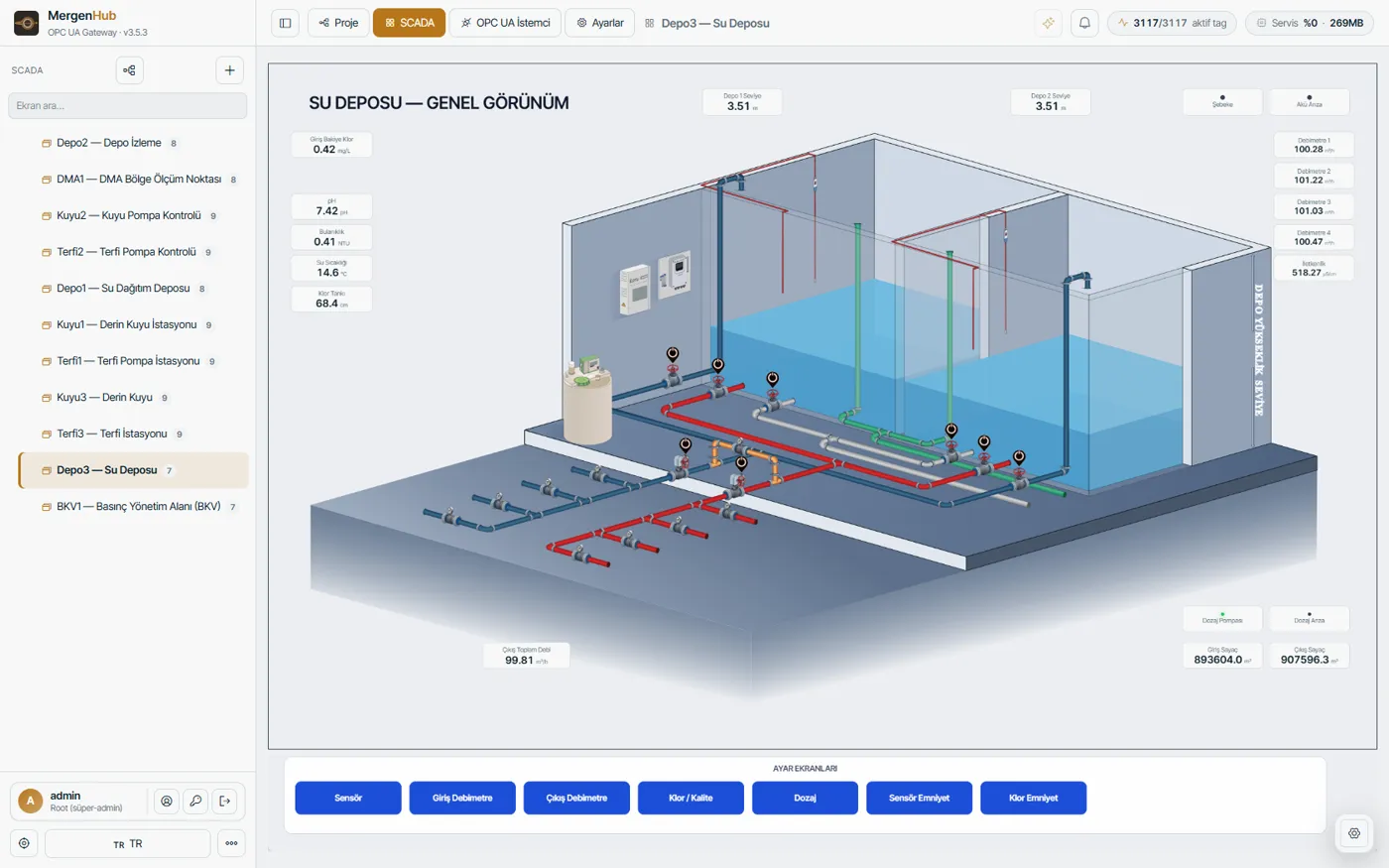
 Settings screen (one of several, opened from the buttons) ↗
 Summary
 Settings tab
In the package
- 163 tags (Omron CP2E memory map)
- Live 3D reservoir screen and 7 settings screens
- Four flowmeters, quality and dosing
- Omron FINS Ethernet (UDP/TCP)
Asked during install
Besides the channel and device name, only these are asked; everything else comes ready.
| Field | Default | Explanation |
|---|---|---|
| PLC IP adresi * | — | Omron CP2E/CS Ethernet ünitesinin IP adresi. |
| Bağlantı | ||
| FINS portu * | 9600 | FINS/UDP ve FINS/TCP varsayılanı 9600. PLC üzerinde değiştirilmişse burayı da değiştirin. |
| IP protokolü | — | CP2E/CS Ethernet üniteleri genelde FINS/UDP konuşur. Cihaz UDP'ye yanıt vermiyorsa TCP/IP deneyin. |
| Hedef düğüm (DA1) | — | PLC'nin FINS düğüm numarası. 0 bırakılırsa IP adresinin SON OKTETİ kullanılır (yaygın kurulum). Farklı ayarlanmışsa PLC'nin Ethernet ünitesindeki değeri girin. |
| Hedef ağ (DNA) | — | Aynı yerel ağdaysanız 0. Yalnız FINS yönlendirme (routing table) kullanılan çok segmentli ağlarda değiştirilir. |
| Hedef birim (DA2) | — | CPU birimi için 0. Yalnız CPU dışı bir üniteye (ör. seri iletişim kartı) yazılırken değişir. |
| Kaynak düğüm (SA1) | — | MergenHub sunucusunun FINS düğüm numarası. 0 bırakılırsa sunucunun yerel IP son okteti kullanılır. PLC'nin izinli düğüm listesi varsa oradaki numarayı girin — aksi hâlde PLC yanıt vermez. |
| Kaynak ağ (SNA) | — | Aynı yerel ağda 0. |
| Kaynak birim (SA2) | — | Neredeyse her zaman 0. (Sürücü bu değeri bu eski anahtardan okur.) |
| İstek boyutu (word) | 64 | Tek FINS isteğinde okunacak word sayısı. Cihaz büyük isteklerde zaman aşımına düşüyorsa küçültün (32/16). |
Screens
- Depo1 — Su Deposu1943×1380
- Depo1 — Sensörsettings screen · 1240×448
- Depo1 — Giriş Debimetresettings screen · 1240×260
- Depo1 — Çıkış Debimetresettings screen · 1240×260
- Depo1 — Klor / Kalitesettings screen · 1240×468
- Depo1 — Dozajsettings screen · 1240×320
- Depo1 — Sensör Emniyetsettings screen · 900×574
- Depo1 — Klor Emniyetsettings screen · 900×400
Phone screens (MergenHub Mobile, phone mode)
- Depo1 — Özetsummary
- Depo1 — Sensörsettings tab
- Depo1 — Giriş Debimetresettings tab
- Depo1 — Çıkış Debimetresettings tab
- Depo1 — Klor / Kalitesettings tab
- Depo1 — Dozajsettings tab
- Depo1 — Sensör Emniyetsettings tab
- Depo1 — Klor Emniyetsettings tab
Screens are fully editable after install. The MergenHub server gets the main screen with its 3D artwork and the wide settings screens; phone mode of MergenHub Mobile gets a summary screen with single-column settings tabs.
Tag list
| Name | Address | Type | Access | Description |
|---|---|---|---|---|
| AcAct | CIO0043.04 | Boolean | read/write | |
| AcAct2 | CIO0044.04 | Boolean | read/write | |
| actdurum1 | D00908 | Word | read/write | |
| actdurum2 | D00918 | Word | read/write | |
| Al_AkuAriza | CIO0128.13 | Boolean | read/write | |
| Al_DozajPompasiAriza | CIO0128.12 | Boolean | read/write | |
| Al_EnerjiKesildi | CIO0128.10 | Boolean | read/write | |
| Analog1AkimDeger | D00034 | Float | read/write | |
| Analog2AkimDeger | D00036 | Float | read/write | |
| Analog3AkimDeger | D00038 | Float | read/write | |
| Analog4AkimDeger | D00040 | Float | read/write | |
| Analog5AkimDeger | D00042 | Float | read/write | |
| Analog6AkimDeger | D00044 | Float | read/write | |
| Analog7AkimDeger | D00046 | Float | read/write | |
| Analog8AkimDeger | D00048 | Float | read/write | |
| BakiyeKlor | D00348 | Float | read/write | |
| Bulaniklik | D00346 | Float | read/write | |
| Debimetre | D00702 | Float | read/write | |
| Debimetre2 | D00704 | Float | read/write | |
| Debimetre3 | D00706 | Float | read/write | |
| Debimetre4 | D00708 | Float | read/write | |
| Depo1Goz1Seviye | D00354 | Float | read/write | |
| Depo1Goz2Seviye | D00356 | Float | read/write | |
| Depo2Goz1Seviye | D00336 | Float | read/write | |
| Depo2Goz2Seviye | D00338 | Float | read/write | |
| DepoCikisDebisi1 | D00432 | Float | read/write | |
| DepoCikisDebisi2 | D00434 | Float | read/write | |
| DepoGirisDebisi1 | D00428 | Float | read/write | |
| DepoGirisDebisi2 | D00430 | Float | read/write | |
| DisOrtamSicaklik | D00474 | Float | read/write | |
| DozajlamaMiktari | D01026 | Float | read/write | |
| DozajPompaStartStopDurumu | CIO0128.11 | Boolean | read/write | |
| DurdurAct | CIO0043.00 | Boolean | read/write | |
| DurdurAct2 | CIO0044.00 | Boolean | read/write | |
| EnerjiBilgi | CIO0128.09 | Boolean | read/write | |
| -HaberlesmeWr | CIO0064.00 | Boolean | read/write | |
| IletkenlikDeger | D00352 | Float | read/write | |
| KapatAct | CIO0043.09 | Boolean | read/write | |
| KapatAct2 | CIO0044.09 | Boolean | read/write | |
| KlorSeviye | D00344 | Float | read/write | |
| KlorSeviyeSensoru | D00344 | Float | read/write | |
| Link_Debimetre | D00200 | Float | read/write | |
| Link_Debimetre2 | D00202 | Float | read/write | |
| Link1_Haberlesme | CIO0064.02 | Boolean | read/write | |
| Link2_Haberlesme | CIO0064.04 | Boolean | read/write | |
| PanoSicaklik | D00472 | Float | read/write | |
| pH | D00350 | Float | read/write | |
| SuSicaklik | D00470 | Float | read/write | |
| T_DepoCikisDebi1Sayac | D01954 | Float | read/write | |
| T_DepoCikisDebi2Sayac | D01956 | Float | read/write | |
| T_DepoGirisDebi1Sayac | D01950 | Float | read/write | |
| T_DepoGirisDebi2Sayac | D01952 | Float | read/write | |
| T_KollektorCikisDebiSayac | D01948 | Float | read/write | |
| T_KollektorGirisDebiSayac | D01942 | Float | read/write | |
| T_SuSayac | D01944 | Float | read/write | |
| TimeoutReset_ACT1 | CIO0028.14 | Boolean | read/write | |
| TimeoutReset_ACT2 | CIO0028.15 | Boolean | read/write | |
| VersiyonBilgi | D16000 | Long | read/write | |
| XA_Analog1Secim | D00800 | Word | read/write | |
| XA_Analog2Secim | D00801 | Word | read/write | |
| XA_Analog3Secim | D00802 | Word | read/write | |
| XA_Analog4Secim | D00803 | Word | read/write | |
| XA_Analog5Secim | D00804 | Word | read/write | |
| XA_Analog6Secim | D00805 | Word | read/write | |
| XA_Analog7Secim | D00806 | Word | read/write | |
| XA_Analog8Secim | D00807 | Word | read/write | |
| XACT_AcilmaZamanAct | D00900 | Word | read/write | |
| XACT_AcilmaZamanAct2 | D00910 | Word | read/write | |
| XACT_ACT1SeviyeSecim | D00926 | Word | read/write | |
| XACT_ACT2SeviyeSecim | D00936 | Word | read/write | |
| XACT_AktifAct | H0010.00 | Boolean | read/write | |
| XACT_AktifAct2 | H0011.00 | Boolean | read/write | |
| XACT_FonksiyonelAct | H0010.01 | Boolean | read/write | |
| XACT_FonksiyonelAct2 | H0011.01 | Boolean | read/write | |
| XACT_KapanmaZamanAct | D00904 | Word | read/write | |
| XACT_KapanmaZamanAct2 | D00914 | Word | read/write | |
| XACT_OtomatikAct | H0010.02 | Boolean | read/write | |
| XACT_OtomatikAct2 | H0011.02 | Boolean | read/write | |
| XC_AnalogCikis1Secim | D01904 | Word | read/write | |
| XC_AnalogCikis2Secim | D01906 | Word | read/write | |
| XC_AnalogCikis3Secim | D01908 | Word | read/write | |
| XC_AnalogCikis4Secim | D01910 | Word | read/write | |
| XC_CalismaModu | D05086 | Word | read/write | |
| XC_DonanimKonfSecim | D05084 | Word | read/write | |
| XC_IstasyonModSecim | D05082 | Word | read/write | |
| XC_PIDYon | H0003.03 | Boolean | read/write | |
| XD_TekSeviyeIslem | H0003.07 | Boolean | read/write | |
| XE_DozajlamaMiktariAlt | D06346 | Float | read/write | |
| XE_DozajlamaMiktariEylem | H0008.15 | Boolean | read/write | |
| XE_DozajlamaMiktariSure | D06350 | Word | read/write | |
| XE_DozajlamaMiktariUst | D06348 | Float | read/write | |
| XH_SunucuHabTimeOut | D01000 | Word | read/write | |
| XK_1m3DozlamaMiktari | D01014 | Float | read/write | |
| XK_DozajPompaRange | D01018 | Float | read/write | |
| XK_KlorlamaYontemSecim | D01010 | Word | read/write | |
| XK_ManuelKlorlamaMiktari | D01012 | Float | read/write | |
| XMOD_ElleResetleme | CIO0150.01 | Boolean | read/write | |
| XMOD_ModemResetAktifPasif | H0001.03 | Boolean | read/write | |
| XMOD_ModemResetTimeOut | D01004 | Word | read/write | |
| XOranACT1_PosManuelOran | D00940 | Float | read/write | |
| XOranACT2_PosManuelOran | D00942 | Float | read/write | |
| XS_Analog1Kalibre | D06172 | Float | read/write | |
| XS_Analog1Max | D06156 | Float | read/write | |
| XS_Analog1Min | D06140 | Float | read/write | |
| XS_Analog2Kalibre | D06174 | Float | read/write | |
| XS_Analog2Max | D06158 | Float | read/write | |
| XS_Analog2Min | D06142 | Float | read/write | |
| XS_Analog3Kalibre | D06176 | Float | read/write | |
| XS_Analog3Max | D06160 | Float | read/write | |
| XS_Analog3Min | D06144 | Float | read/write | |
| XS_Analog4Kalibre | D06178 | Float | read/write | |
| XS_Analog4Max | D06162 | Float | read/write | |
| XS_Analog4Min | D06146 | Float | read/write | |
| XS_Analog5Kalibre | D06180 | Float | read/write | |
| XS_Analog5Max | D06164 | Float | read/write | |
| XS_Analog5Min | D06148 | Float | read/write | |
| XS_Analog6Kalibre | D06182 | Float | read/write | |
| XS_Analog6Max | D06166 | Float | read/write | |
| XS_Analog6Min | D06150 | Float | read/write | |
| XS_Analog7Kalibre | D06184 | Float | read/write | |
| XS_Analog7Max | D06168 | Float | read/write | |
| XS_Analog7Min | D06152 | Float | read/write | |
| XS_Analog8Kalibre | D06186 | Float | read/write | |
| XS_Analog8Max | D06170 | Float | read/write | |
| XS_Analog8Min | D06154 | Float | read/write | |
| XS_Debi1LinkLokal | H0007.00 | Boolean | read/write | |
| XS_Debimetre1TipSecim | D00694 | Word | read/write | |
| XS_Debimetre2TipSecim | D00696 | Word | read/write | |
| XS_Debimetre3TipSecim | D00698 | Word | read/write | |
| XS_Debimetre4TipSecim | D00700 | Word | read/write | |
| XS_DebimetreSecim | D03602 | Word | read/write | |
| XS_DebimetreSecim2 | D03603 | Word | read/write | |
| XS_PulseDebi2Miktar | D00682 | Float | read/write | |
| XS_PulseDebiMiktar | D00670 | Float | read/write | |
| XS_SicaklikKanal1Kalibre | D00634 | Float | read/write | |
| XS_SicaklikKanal1Secim | D01774 | Word | read/write | |
| XS_SicaklikKanal2Kalibre | D00642 | Float | read/write | |
| XS_SicaklikKanal2Secim | D01776 | Word | read/write | |
| XS_SicaklikKanal3Kalibre | D00650 | Float | read/write | |
| XS_SicaklikKanal3Secim | D01778 | Word | read/write | |
| XS_SicaklikKanal4Kalibre | D00658 | Float | read/write | |
| XS_SicaklikKanal4Secim | D01780 | Word | read/write | |
| XS_Debimetre1Atama | D00410 | Word | read/write | |
| XS_Debimetre2Atama | D00412 | Word | read/write | |
| XS_Debimetre3Atama | D00414 | Word | read/write | |
| XS_Debimetre4Atama | D00416 | Word | read/write | |
| XOV_OV1Aktif | H0002.02 | Boolean | read/write | |
| XOV_OV2Aktif | H0002.03 | Boolean | read/write | |
| XZ_Sn | D00454 | Word | read/write | |
| XZ_Dk | D00455 | Word | read/write | |
| XZ_Saat | D00456 | Word | read/write | |
| XZ_Gun | D00457 | Word | read/write | |
| XZ_Ay | D00458 | Word | read/write | |
| XZ_Yil | D00459 | Word | read/write | |
| XZ_HaftaGun | D00460 | Word | read/write | |
| zamanDk | D01103 | Word | read/write | |
| zamanSaat | D01104 | Word | read/write | |
| zamanGun | D01105 | Word | read/write | |
| zamanAy | D01106 | Word | read/write | |
| zamanYil | D01107 | Word | read/write | |
| zamanHaftaGun | D01108 | Word | read/write | |
| zamanSn | D01102 | Word | read/write | |
| XZ_zamanSet | CIO0192.06 | Boolean | read/write |
How to install
MergenHub server
- Web interface › Device Library
- Find this device, tick it, Install
- Enter IP and station name
MergenHub Mobile
- Add device › Device library
- Works in server mode and phone mode
- Answer the install questions
File + AI
- Download the .mhpkg.json file
- Optional: give it to an AI assistant with your changes (the file has a built-in guide)
- Import: MergenHub or the mobile app › Import package